
If you’ve been wondering how the 66 game withdraw process actually works — from unlocking your balance to seeing real money land in your bank account — this guide covers everything you need to know. Whether you’re a first-time user or someone troubleshooting a stuck transaction, the information here will walk you through each stage clearly, practically, and without any guesswork.
Why Understanding the 66 Game Withdraw Process Matters
Most users focus entirely on deposits and gameplay, treating the withdrawal step as an afterthought. That mindset leads to frustration. The 66 game platform has a structured payout system with specific conditions that must be met before any funds can move out of your account. Knowing these rules ahead of time puts you in full control of your money — and eliminates surprises when you’re ready to cash out.
Step 1 — Link a Verified Bank Account Before Anything Else
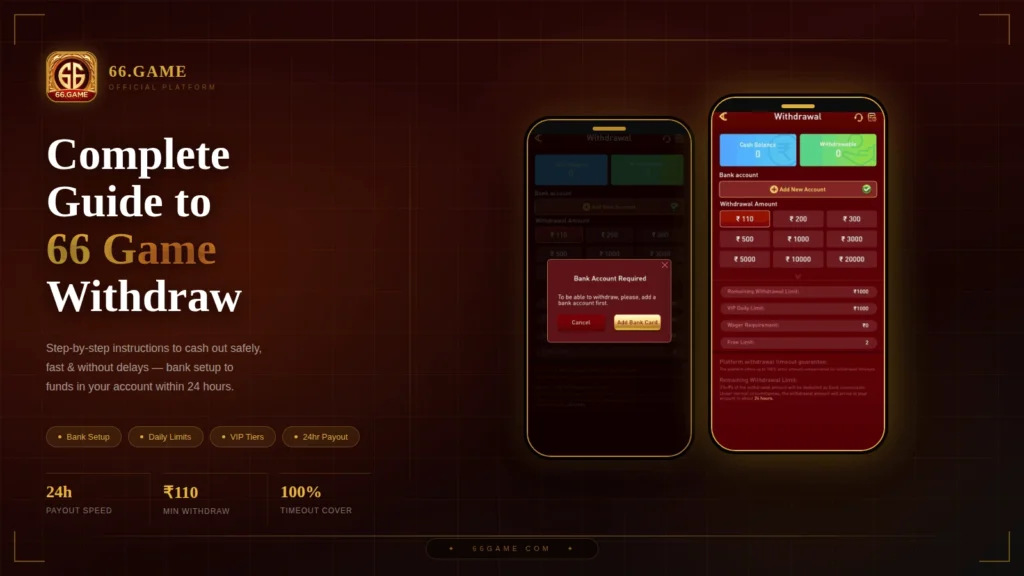
The very first thing the 66 game system checks when you attempt a withdrawal is whether a valid bank account is connected to your profile. Without this, the platform will block the transaction entirely and display a prompt asking you to add banking details first.
This isn’t just a procedural formality. There are solid reasons behind it:
- Regulatory compliance: Platforms operating within financial frameworks are legally required to confirm that funds travel between verified, matching identities. This prevents anonymous money movement.
- Account security: Even if someone gains access to your login credentials, they cannot redirect your funds to an unauthorized account. Your bank details act as a second layer of protection.
- Transfer accuracy: Routing errors caused by incorrect account numbers or bank codes are significantly reduced when details are stored and verified in advance.
To add your bank account, tap Add New Account from the withdrawal screen, then enter your account number, bank routing details, and registered account name exactly as they appear on your official bank documents.
Step 2 — Understand the Difference Between Cash Balance and Withdrawable Balance
This is the point where most new 66 game users get confused, and it’s worth spending time here.
Your Cash Balance represents the total funds sitting inside your wallet — including deposits, bonuses, and any earnings still attached to operational terms. Think of it as the gross total.
Your Withdrawable Balance, on the other hand, is the portion of those funds that is fully liquid and eligible for immediate payout. This is the number that actually determines whether your withdrawal can go through.
Key insight: A high Cash Balance does not guarantee a high Withdrawable Balance. If your withdrawable amount shows zero, no transaction will process — no matter how large your total balance appears.
Always check your Withdrawable Balance before initiating a 66 game withdraw request.
Step 3 — Know Your Daily Withdrawal Limits and Account Tier
The 66 game platform enforces daily withdrawal caps to maintain transaction security and system stability. These limits are tied to your account tier within the VIP loyalty framework.
Here’s a breakdown of how these parameters work in practice:
| Parameter | Details |
|---|---|
| Daily Withdrawal Limit | The maximum total amount you can withdraw within a single calendar day |
| VIP Tier Ceiling | Your personal daily cap, which scales upward as your account tier increases |
| Wager Requirement | Transactional volume that must be completed before bonus funds become withdrawable |
| Free Withdrawal Quota | The number of fee-free withdrawals available within your current billing cycle |
If your requested withdrawal amount exceeds your remaining daily limit, the system will not allow it to proceed. Plan your cashouts accordingly, especially if you’re withdrawing larger amounts across multiple days.
Step 4 — Factor In Fees Before You Confirm the Amount
Before you hit the withdraw button, make sure you understand the commission structure that applies to every 66 game withdraw transaction.
The platform applies a combined fee of 3% of the withdrawal amount plus a fixed ₹6 administrative charge. This is deducted automatically from the requested sum before it’s sent to your bank.
Example: If you request a ₹1,000 withdrawal:
- 3% of ₹1,000 = ₹30
- Fixed charge = ₹6
- Total deducted: ₹36
- Amount received: ₹964
Factor this into your cashout planning so the amount arriving in your account matches your expectations. Additionally, the platform offers a timeout compensation guarantee — if a transaction fails due to a processing delay on the network side, you are covered up to the full order value.
Step 5 — Execute the Withdrawal Correctly
Once your bank account is linked, your Withdrawable Balance is confirmed, and you’ve accounted for daily limits and fees, you’re ready to proceed. Here’s the exact sequence to follow on the 66 game platform:
- Open the app and navigate to the Withdrawal section from the main dashboard.
- Review your Withdrawable Balance — confirm it meets the minimum required threshold.
- Select your destination bank account, or add a new one if needed.
- Enter or select your desired cashout amount using the preset tier options or by typing a custom value.
- Confirm that the requested amount fits within your Remaining Daily Limit.
- Tap the Withdraw button to submit your transaction to the processing queue.
Under normal banking conditions, funds typically arrive within 24 hours of submission.
Troubleshooting Common 66 Game Withdraw Issues
Even with a perfect setup, occasional hiccups happen. Here are the most common problems and how to address them:
Transaction taking longer than 24 hours? External delays are usually caused by banking network congestion, public holidays, or scheduled maintenance windows on the recipient bank’s end. Check your transaction history for real-time status updates before contacting support.
Withdrawable Balance showing zero despite a visible Cash Balance? This typically means bonus funds still carry an active wager requirement. You need to meet the required transactional turnover before those funds unlock for cashout.
Daily limit already maxed out? Your remaining daily limit resets at the start of each calendar day. If you need higher daily limits on a consistent basis, increasing your account activity will advance your VIP tier and raise your ceiling automatically.
Bank details rejected during setup? Double-check that every detail — account number, bank code, registered name — matches your official bank records exactly. Even a single character mismatch can trigger a validation failure.
How to Increase Your 66 Game Withdraw Limit Over Time
The 66 game VIP tier framework is designed to reward active and consistent users. The more you engage with the platform over time, the higher your account classification climbs — and with it, your daily withdrawal ceiling.
There is no shortcut to tier advancement. It is driven entirely by cumulative account activity and transaction volume. Users who maintain regular engagement naturally unlock higher daily limits, priority processing, and additional free withdrawal allocations per cycle.
Final Thoughts on 66 Game Withdraw
The 66 game withdraw system is built around transparency, security, and user protection — but only if you understand how each component works together. By linking your bank account early, keeping a clear eye on your Withdrawable Balance, respecting daily limits, and accounting for applicable fees, you remove every friction point from the process.
Cashouts on the 66 game platform are designed to be fast, reliable, and secure. Arm yourself with the right knowledge, and your funds will move smoothly every time.
For the most current information on withdrawal policies, fee structures, and account tier benefits, always refer to the official 66 game support documentation or in-app help center.